Color LookBehind the build
From ideas, art, and sound to a working product and release. Explore each chapter, its challenges, and the solutions.
 Project image
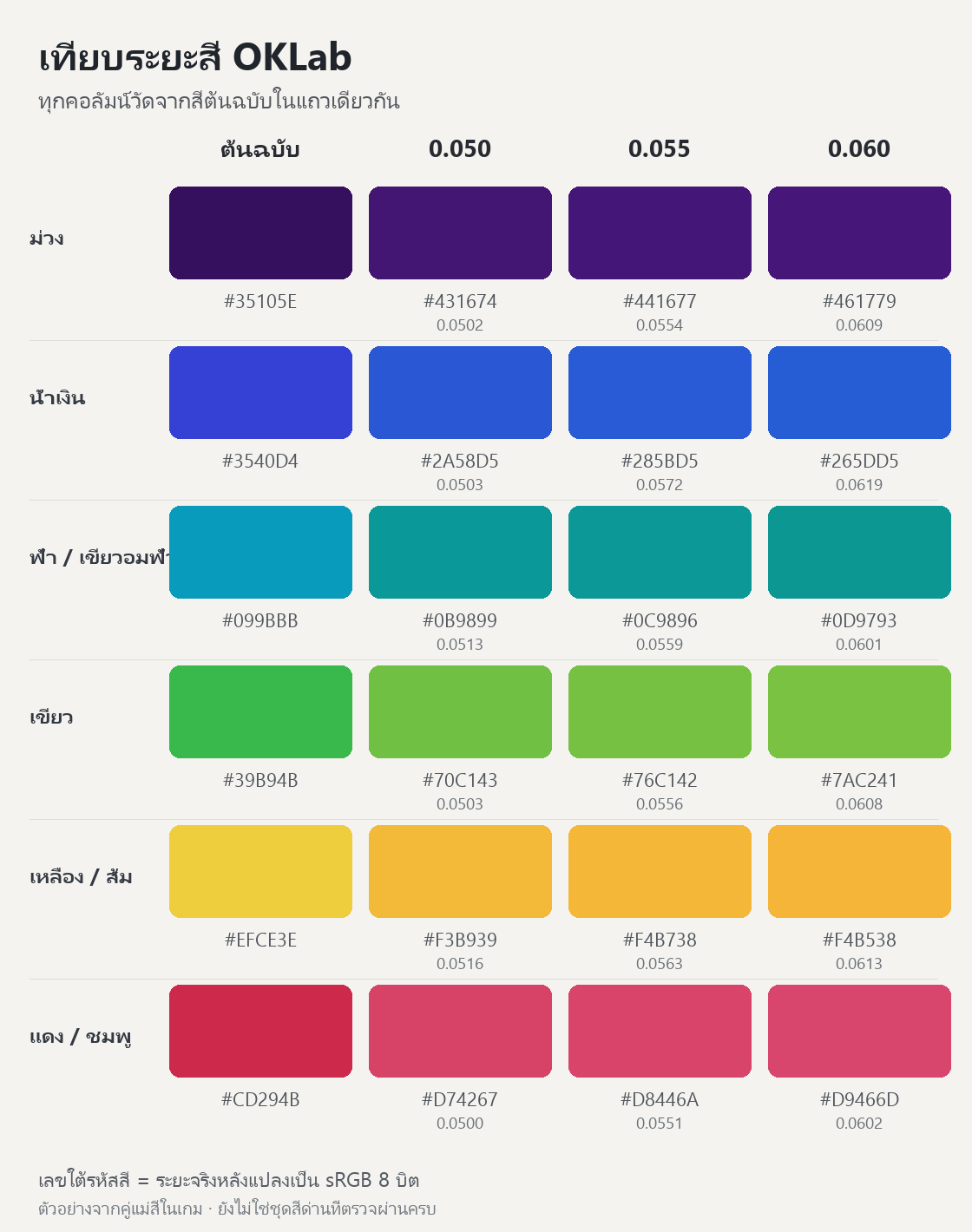
QA study of 0.050 / 0.055 / 0.060 color distances, not the complete validated stage catalog.
Supporting media
When color is the rule, validate the pixels too
Where it started
Create clear Gem visuals and validate every color pair both in the generator and after display-color conversion.
The design challenge
Colors that differ mathematically can become too similar after conversion, making the challenge about visibility instead of ordering.
The solution
Enforce a minimum color distance and recheck every stage after conversion so the generator and displayed result share the same standard.
- Use OKLab for authoritative challenge generation and validation.
- Check every color pair before and after Color32 / 8-bit sRGB conversion.
- Produce comparison sheets and sweep the whole stage catalog rather than inspecting a few samples.
Technical details & evidence
Development process
Color Look combines perceptual ordering with tactile Gems. Rendering must preserve color relationships rather than letting lighting or conversion obscure the challenge.
- Use OKLab for authoritative challenge generation and validation.
- Check every color pair before and after Color32 / 8-bit sRGB conversion.
- Produce comparison sheets and sweep the whole stage catalog rather than inspecting a few samples.
Design constraints
Distinct source colors can become too close or identical after 8-bit quantization, so RGB-only checks or concept images are insufficient.
Implementation
Enforce a minimum pairwise OKLab distance of 0.05, preserve higher configured floors, share validation rules between generator and validator, and cap Gem counts.
Evidence & limits
The 9 Oct audit generated 5,000 stages and checked 2,667,846 pairs, finding none below 0.05 after conversion. This validates the generator, not every player’s visual perception.
Source: Docs/QA/ColorReadability-20261009/README.md
Small sounds that bring play to life
The 0.18-second Gem-selection cue from select.wav, synthesized for the initial sound set.
Supporting media
Make sound explain the action
Where it started
Synthesize short cues that distinguish taps, assists, and rewards without overpowering the color puzzle.
What went wrong
Returning from Settings lost the Gameplay music context, and coin ticks needed to avoid interrupting the success cue.
The solution
Restore the existing run track and use a separate, reusable, rate-limited voice for coin ticks.
- Define separate roles and durations for taps, selection, Reveal, Preview, and success.
- Check duration and peak level with ffprobe/volumedetect before Unity import.
- Separate the success cue from Gold-count ticks and reuse the music source.
Technical details & evidence
Development process
The initial soft-lab palette uses short touch/assist transients and stronger Gold or Perfect cues, synthesized with FFmpeg oscillators and envelopes.
- Define separate roles and durations for taps, selection, Reveal, Preview, and success.
- Check duration and peak level with ffprobe/volumedetect before Unity import.
- Separate the success cue from Gold-count ticks and reuse the music source.
Recorded problem
Returning from Settings failed to restore the gameplay music context. Gold counting also needed to avoid interrupting the success cue or spawning a voice per coin.
Implementation
Restore the Gameplay BGM page with the same run track; reuse a separate rate-limited tick voice and preserve mute/pause preferences.
Evidence & limits
The initial provenance records peak/duration checks; the 8 Oct fix includes targeted BGM-return tests. The sample below is the selection transient, not the current release’s complete music library.
Source: Docs/Presentation/AudioAssetProvenance.md + Docs/QA/TextAndSettings-20261008.md
Preview should animate the face in view
Where it started
Separate game answers from animation and test Preview on multi-face boards with reproducible stages.
What went wrong
Flipping all Gems together let hidden-face pieces protrude around the cube, confusing the presentation despite a correct answer.
The solution
Animate only the visible face and settle hidden faces immediately. Restoration follows the face currently in view.
- Reproduce a case from its seed and preserve the player’s selection before Preview.
- Lock input during presentation and resolve Keep/Clear through the game state.
- Check Preview entry, cancellation, restoration, and cube-face navigation.
Technical details & evidence
Development process
Stage Seeds define the challenge; Run Seeds define shuffling. Animation follows game state rather than owning scoring correctness.
- Reproduce a case from its seed and preserve the player’s selection before Preview.
- Lock input during presentation and resolve Keep/Clear through the game state.
- Check Preview entry, cancellation, restoration, and cube-face navigation.
Recorded problem
Flipping every cube face let hidden Gems protrude around the edges, creating visual confusion even when the core answer remained correct.
Implementation
Animate the visible face, settle hidden faces immediately through the completed-state path, and restore only the face currently in view.
Evidence & limits
The 7 Oct record reports 3/3 passing PlayMode checks. Its historical 96-Gem fixture predates the 9 Oct Gem cap and does not describe the newer difficulty policy.
Source: Docs/QA/PreviewVisibleFace-20261007.md
Audit real text across locales and sizes
Where it started
Audit real text across screens in Thai and English, including enlarged text on phone and tablet layouts.
What went wrong
Result headings clipped, long music titles crowded artist names, and swipe guidance shared a line with the stage number.
The solution
Size areas for the actual text, separate hints from headings, and preserve wrapping behavior when text size changes.
- Visit the screen matrix across phone/tablet, Thai/English, and 100%/120% text sizes.
- Record overflow/truncation with screen context and text-area dimensions.
- Wait for actual interactability rather than guessing transition completion with fixed delays.
Technical details & evidence
Development process
Music titles, result headings, and cube labels vary in length. A normal-size English layout does not cover enlarged Thai text.
- Visit the screen matrix across phone/tablet, Thai/English, and 100%/120% text sizes.
- Record overflow/truncation with screen context and text-area dimensions.
- Wait for actual interactability rather than guessing transition completion with fixed delays.
Recorded problem
Result headings clipped their last characters, Thai Home copy lacked height, long music titles crowded artists, and cube labels combined stage and swipe guidance in one line.
Implementation
Provide text-specific height and Thai shaping, separate swipe guidance, wrap music titles, and preserve authored wrapping during text-scale refresh.
Evidence & limits
The 8 Oct audit covers 239 screen/locale/scale contexts with no remaining overflow/truncation after rerun. These are Unity PlayMode results, not a native-device pass.
Source: Docs/QA/TextAndSettings-20261008.md
A locked startup that stopped responding
Where it started
Reproduce a locked startup on a physical device and inspect what Android and Unity threads are waiting for.
What went wrong
In the reproduced A17 case, the app hung after unlocking and the trace supported Android and Unity waiting on each other. Investigation focused on startup lifecycle rather than guessing at slow artwork.
The solution
Use Unity’s standard Activity entry point, then verify both a local installation and the Play-delivered build.
- Reproduce a locked cold start on A17 and inspect ANR/thread state.
- Build a signed candidate and test both local APK and Play-delivered installation.
- Exercise focus changes, Back, Settings, Privacy, and continued play in the same process.
Technical details & evidence
Development process
This failure needed a physical-device trace rather than a screenshot or a guess about slow assets. Investigation started at Android/Unity lifecycle boundaries.
- Reproduce a locked cold start on A17 and inspect ANR/thread state.
- Build a signed candidate and test both local APK and Play-delivered installation.
- Exercise focus changes, Back, Settings, Privacy, and continued play in the same process.
Recorded problem
The UI thread waited on surface destruction while Unity’s game thread waited on accessibility initialization, supporting a lifecycle deadlock in the reproduced case.
Implementation
Switch from GameActivity to the standard Unity Activity, adjust theme/metadata, and route Android Back through the appropriate platform callback.
Evidence & limits
Play-delivered code 9 passed locked start, resume, navigation, and stage completion on A17 without a new ANR in that run. This does not establish one cause for all ANRs on all devices.
Source: Docs/QA/A17-Startup-ANR-20261001.md
Bring it together before release
From individual parts to one app
Publish Android 1.1.6 (21) to Internal testing, then install it through Google Play on A17 to verify the delivered release artifact.
The app and listing must agree
Build 20 clipped English Tutorial copy at 120% text size. Build 21 expands the text area and rechecks both locales; S25 bulk fixtures use a separate QA package.
Recorded release status
Promote the same Store-tested build 21 artifact to Production review with symbols and Thai/English notes. The 8 Oct report still records public production as build 19.
Dated project evidence, not a live Store lookup.
Build details & records
Integration
- Use Unity 6 and URP, keeping gameplay correctness independent of animations, audio, and effects.
- Separate the Stage Seed defining a challenge from the Run Seed shuffling its positions so reported stages are reproducible.
- Validate after Color32 conversion too: mathematically distinct colors can become too close in the displayed result.
Evidence
The 9 Oct 2026 C# harness audit generated 5,000 stages and checked 2,667,846 color pairs, finding no invalid challenges or pairs below OKLab 0.05 after 8-bit sRGB conversion. These are generator checks, not player statistics or handset performance measurements.
Store submission
Build 21 was published to Internal testing, installed through Google Play for A17 and S25 checks, then promoted using the same artifact with native symbols and Thai/English release notes. At the recorded date, public production remained on 19 while 21 was in review.
Project records
- Docs/QA/ColorReadability-20261009/README.md
- Docs/Presentation/AudioAssetProvenance.md + Docs/QA/TextAndSettings-20261008.md
- Docs/QA/PreviewVisibleFace-20261007.md
- Docs/QA/TextAndSettings-20261008.md
- Docs/QA/A17-Startup-ANR-20261001.md
- README.md
- Docs/QA/Release21-20261008.md